
आज जब किसी customer को अपने आसपास कोई shop, restaurant, clinic, service provider या local business चाहिए होता है, तो वह अक्सर Google Search या Google Maps पर उसे खोजता है।
हालाँकि,यहीं पर Google Business Profile (GBP) आपके business के लिए important हो जाता है।
Google Business Profile Google का एक free business listing tool है, इसलिए इसकी मदद से eligible businesses अपनी business information को Google Search और Google Maps पर manage कर सकते हैं। इसमें business name, category, location, phone number, website, business hours, photos, reviews और services जैसी जानकारी दिखाई जा सकती है।
लेकिन सिर्फ Google Business Profile बना लेना काफी नहीं है। अगर आपकी profile में important information missing है, गलत category selected है या profile properly maintained नहीं है, तो potential customers को आपके business के बारे में सही information नहीं मिल सकती।
इस guide में हम step-by-step समझेंगे कि Google Business Profile क्या है, इसे कैसे बनाया जाता है, verification कैसे होती है, profile को properly optimize कैसे करें और Google Maps पर local visibility improve करने के लिए किन बातों का ध्यान रखें।
Table of Contents
ToggleGoogle Business Profile Kya Hai?
Google Business Profile (GBP) Google का एक free business listing tool है, इसलिए इसकी मदद से eligible businesses अपनी business information को Google Search और Google Maps पर manage कर सकते हैं।
जब कोई customer आपके business का नाम या आपके जैसे products/services को local area में search करता है, तो Google आपके business की relevant information दिखा सकता है।
उदाहरण के लिए, कोई व्यक्ति “furniture shop near me”, “digital marketing agency in Motihari”, “dentist near me” या “plumber near me” search करता है। ऐसे local searches में relevant businesses Google Search और Google Maps पर दिखाई दे सकते हैं।
एक properly maintained Business Profile customer को आपके business के बारे में महत्वपूर्ण information जल्दी समझने में मदद करती है—जैसे आप क्या service देते हैं, कहाँ located हैं, कब open रहते हैं और आपसे contact कैसे किया जा सकता है।
इसलिए local business के लिए Google Business Profile केवल एक online listing नहीं है। यह Google पर आपके business की local online presence का एक महत्वपूर्ण हिस्सा है।
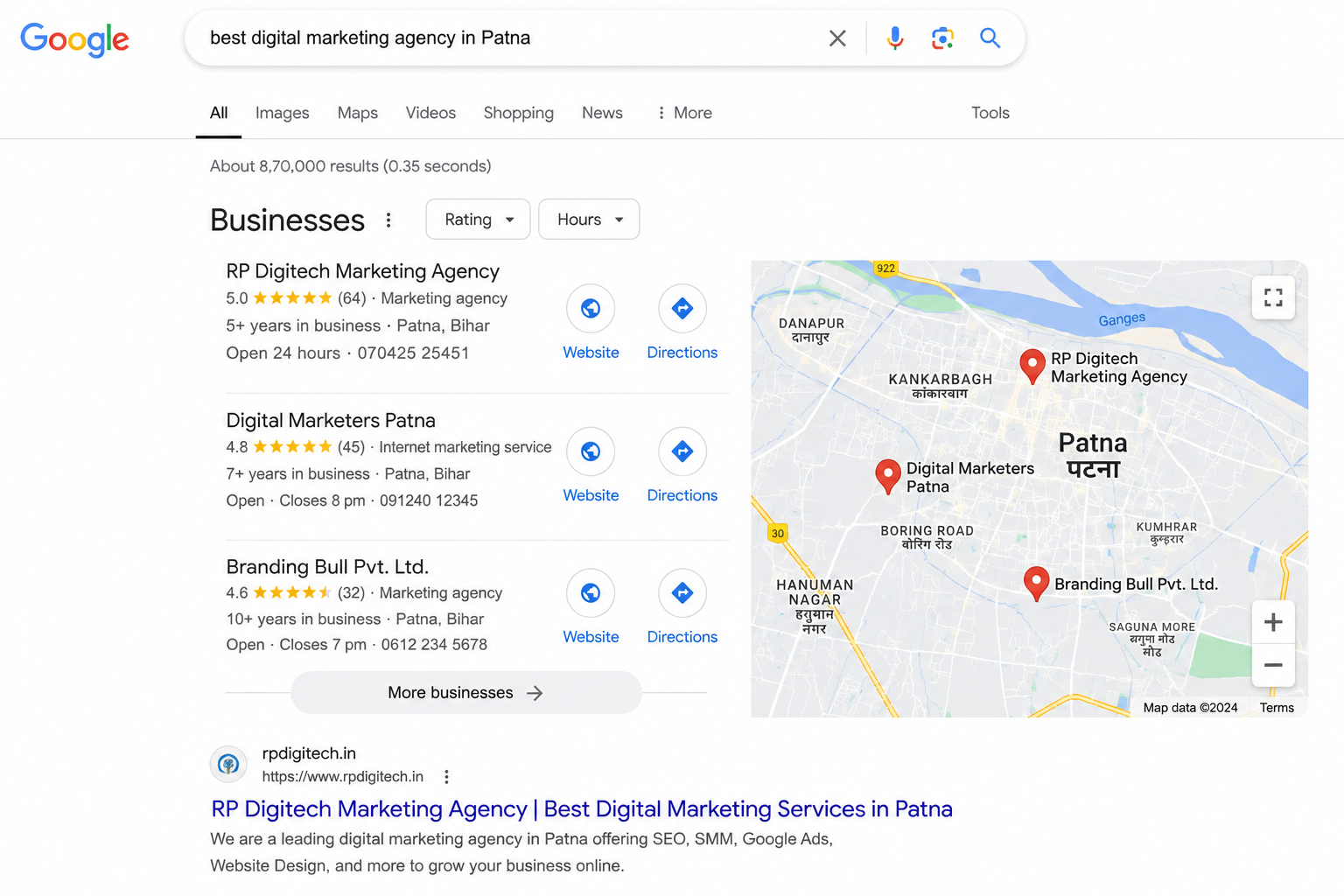
Google Business Profile और Google My Business में क्या Difference है?
“यदि आपने पहले Google पर अपने बिज़नेस की Listing बनाई है, तो आपने ‘Google My Business’ यानी ‘GMB’ का नाम अवश्य सुना होगा। **दरअसल**, Google My Business (GMB) Google के पुराने बिज़नेस लिस्टिंग प्लेटफॉर्म का नाम था। **हालांकि**, Google ने बाद में इसे बदलकर ‘Google Business Profile’ कर दिया। **यही कारण है कि** आज भी अगर कोई ‘GMB’ या ‘Google Business Profile’ जैसे शब्दों का इस्तेमाल करता है, तो अक्सर वह असल में Google पर बिज़नेस लिस्टिंग और उसकी मैनेजमेंट की ही बात कर रहा होता है।”
क्या GMB और Google Business Profile अलग-अलग हैं?
नहीं। वर्तमान terminology में Google Business Profile ही सही नाम है।
Google Business Profile के माध्यम से eligible businesses Google Search और Google Maps पर अपनी business information manage कर सकते हैं।
इसमें आप जैसी information manage कर सकते हैं:
Business name
Primary business category
Address या service area
Phone number
Website
Business hours
Photos और videos
Services
Customer reviews
Business updates और अन्य available profile features
एक आसान Example
मान लीजिए आपकी एक furniture shop है।
जब कोई customer Google पर “furniture shop near me” या आपके business का नाम search करता है, तो आपकी Business Profile में उपलब्ध information उसे आपके business के बारे में जल्दी जानकारी दे सकती है।
Customer वहाँ से आपकी location देख सकता है, phone से contact कर सकता है, website visit कर सकता है या उपलब्ध होने पर अन्य business actions ले सकता है।
इसलिए आज आपको GMB बनाने की बजाय Google Business Profile को create, verify और properly optimize करने पर focus करना चाहिए।
Google Business Profile Local Business Ke Liye Kyun Zaroori Hai?
अगर आपका business local customers को target करता है, तो Google Business Profile आपकी online presence का एक important हिस्सा हो सकता है।
मान लीजिए किसी customer को अपने आसपास furniture shop, salon, restaurant, clinic या electrician की जरूरत है। वह Google Search या Google Maps पर उस service को search कर सकता है।
अगर आपका business उस local search के लिए relevant है और आपकी Business Profile Google पर दिखाई देती है, तो customer आपके business के बारे में जरूरी information देख सकता है।
Google Business Profile से Customer क्या कर सकता है?
एक Business Profile से customer, available features के अनुसार:
आपके business का नाम और category देख सकता है
Location और directions देख सकता है
Phone number से call कर सकता है
Website visit कर सकता है
Business hours check कर सकता है
Photos देखकर business को समझ सकता है
Customer reviews पढ़ सकता है
आपके द्वारा दी जाने वाली services की जानकारी देख सकता है
इसका मतलब यह है कि Google Business Profile केवल “business को Google Maps पर दिखाने” तक सीमित नहीं है। यह customer को business खोजने से लेकर contact करने तक की journey में मदद कर सकता है।
Google Business Profile से Direct Customers कैसे आ सकते हैं?
इसे एक simple customer journey से समझिए:
Google Search / Google Maps
↓
आपकी Business Profile
↓
Customer आपकी information देखता है
↓
Reviews, photos और services check करता है
↓
Call / Website / Directions
↓
Potential Customer
हालांकि, इसका मतलब यह नहीं है कि केवल profile बनाने से हर business को automatically customers मिलने लगेंगे।
आपकी visibility कई factors पर depend करती है, जिसमें search relevance, business location और prominence जैसे local ranking factors शामिल हैं। इसलिए profile को accurate रखना और उसे properly maintain करना महत्वपूर्ण है।
किन Businesses को Google Business Profile पर Focus करना चाहिए?
Google Business Profile खास तौर पर उन businesses के लिए useful हो सकता है जो customers को किसी specific location या service area में serve करते हैं।
उदाहरण के लिए:
Furniture Shops
Restaurants
Salons & Beauty Parlours
Clinics
Hotels
Electricians
Plumbers
Real Estate Businesses
Coaching Institutes
Repair Services
Retail Shops
Local Manufacturers
Digital Marketing Agencies
अगर आपका business local customers से calls, enquiries, visits या website leads प्राप्त करना चाहता है, तो Google Business Profile को अपनी digital marketing strategy का हिस्सा बनाना समझदारी हो सकती है।
Google Business Profile Kaise Banayein? Step-by-Step Guide
Google Business Profile बनाना मुश्किल नहीं है, लेकिन शुरुआत में सही business information देना बहुत जरूरी है। गलत name, category, address या दूसरी information बाद में problems create कर सकती है।
नीचे basic process step-by-step समझते हैं।
Step 1: Google Business Profile पर जाएँ
सबसे पहले अपने Google Account से Google Business Profile setup शुरू करें।
आप Google Search में “Google Business Profile” search करके official Google Business Profile page से process शुरू कर सकते हैं।
अगर आपका business पहले से Google पर मौजूद है, तो नया profile बनाने से पहले उसे search करके check करें। कई बार customers या Google के existing data की वजह से business पहले से listing के रूप में दिखाई दे सकता है।
Step 2: अपने Business का नाम डालें
अपने business का real-world business name इस्तेमाल करें।
उदाहरण:
RP Digitech Marketing Agency
Business name में ranking improve करने के लिए extra keywords जोड़ना सही तरीका नहीं है।
उदाहरण के लिए:
❌ RP Digitech Marketing Agency – Best SEO & Google Maps Ranking Company
अगर आपका वास्तविक business name ऐसा नहीं है, तो इस तरह keyword stuffing करने से बचना चाहिए।
सही approach:
✅ RP Digitech Marketing Agency
Step 3: Primary Business Category चुनें
इसके बाद अपने business के लिए सबसे relevant Primary Category select करें।
Category बहुत important है क्योंकि इससे Google को यह समझने में मदद मिलती है कि आपका business किस type का है।
उदाहरण के लिए, अगर आपका main business digital marketing services provide करता है, तो ऐसी category चुननी चाहिए जो आपके actual business से सबसे closely match करती हो।
Category केवल ranking के लिए नहीं, business की actual service के आधार पर चुनें।
Step 4: Business Location या Service Area सेट करें
अगर customers आपके physical location पर आते हैं, तो आप अपने business address की information दे सकते हैं।
अगर आपका business customers के पास जाकर service देता है, तो applicable होने पर service area सेट किया जा सकता है।
यहाँ सबसे जरूरी बात है कि address या service area वही रखें जहाँ आपका business वास्तव में operate करता है।
Step 5: Contact Information Add करें
अब business का contact information add करें:
Phone number
Website
Other available contact details
यह information accurate और up-to-date होनी चाहिए ताकि customer आसानी से आपके business से contact कर सके।
Step 6: Business Hours Add करें
अपने actual opening hours add करें।
अगर आपके business के working hours बदलते हैं, तो profile में उन्हें update रखें। Holidays या special occasions के लिए applicable special hours भी update किए जा सकते हैं।
गलत business hours customer experience को नुकसान पहुँचा सकते हैं।
Step 7: Business Verification Complete करें
Google को यह verify करना पड़ सकता है कि business वास्तव में आपके द्वारा claim किया गया है।
Verification method हर business के लिए एक जैसा नहीं होता। Google आपके business और account के आधार पर उपलब्ध verification options दिखा सकता है।
Available method के अनुसार verification video recording, phone/SMS, email या दूसरे methods से हो सकती है।
इसलिए किसी एक verification method को सभी businesses के लिए guaranteed या default method नहीं मानना चाहिए।
Step 8: Profile की बाकी Information Complete करें
Verification के बाद profile में available information को properly complete करें।
इसमें business description, services, photos और अन्य relevant details शामिल हो सकती हैं।
याद रखें:
Complete information का मतलब हर जगह keywords भरना नहीं है।
Information accurate, useful और customer-focused होनी चाहिए।
Google Business Profile Verification Kaise Karein?
Google Business Profile बनाने के बाद Google आपसे यह verify करने के लिए कह सकता है कि आपका business वास्तविक है और profile को manage करने का अधिकार आपके पास है।
Important: सभी businesses के लिए verification का तरीका एक जैसा नहीं होता। Google आपके business, region और उपलब्ध information के आधार पर अलग-अलग verification options दिखा सकता है।
Google Business Profile Verification के Common Methods
आपके profile में Google द्वारा उपलब्ध कराए गए options के आधार पर verification इनमें से किसी तरीके से हो सकती है:
Video verification
Phone या SMS
Email
Postcard या mail
अन्य available verification methods
हर profile में सभी options available हों, यह जरूरी नहीं है।
1. Video Verification
कुछ businesses के लिए Google video verification का option दिखा सकता है।
इसमें आपको अपने business को वास्तविक रूप से दिखाने वाला video record करना पड़ सकता है। Video में Google यह देखना चाह सकता है कि:
Business location या service area से जुड़ी वास्तविक जानकारी मौजूद है
Business का signage या branding दिखाई दे सकती है
आप business को operate करने की स्थिति में हैं
Business के tools, equipment, products या working area जैसे relevant evidence मौजूद हैं
जो चीज आपके business में वास्तव में मौजूद नहीं है, उसे video में दिखाने की कोशिश न करें।
2. Phone या SMS Verification
अगर आपके profile में phone या SMS verification available है, तो Google आपके business से जुड़े phone number पर verification code भेज सकता है।
Code प्राप्त होने के बाद उसे Google के verification process में enter करके verification complete की जा सकती है।
3. Email Verification
कुछ businesses को email verification का option मिल सकता है।
अगर यह option available है, तो Google द्वारा दिए गए instructions के अनुसार verification email को use करके process complete करें।
4. Postcard या Mail Verification
कुछ cases में Google business address पर verification code भेज सकता है।
अगर यह method आपके profile में available है, तो Google के instructions के अनुसार postcard/code का इस्तेमाल करके verification complete करें।
Verification के दौरान इन गलतियों से बचें
1. Fake information न दें
Business name, address, phone number और दूसरी details वास्तविक होनी चाहिए।
2. Keyword stuffing न करें
Business name में ranking के लिए extra keywords जोड़ना सही approach नहीं है।
3. Duplicate profile न बनाएं
अगर आपका business पहले से Google पर मौजूद है, तो नया duplicate profile बनाने से पहले existing listing को check करें।
4. Verification के लिए fake location का इस्तेमाल न करें
आपके द्वारा दी गई business information वास्तविक business operation से match करनी चाहिए।
Verification होने में कितना समय लगता है?
Verification का process और review time business तथा verification method के अनुसार अलग हो सकता है। इसलिए verification को हमेशा तुरंत complete होने की guarantee नहीं माननी चाहिए।
अगर Google additional review या information मांगता है, तो दिए गए instructions को carefully follow करें।
Verification complete होने के बाद अगला important step profile optimization है।
सिर्फ verified profile होना पर्याप्त नहीं है। आपको अपनी business information को accurate, complete और customer-focused रखना चाहिए।
Google Business Profile Ko Optimize Kaise Karein?
Google Business Profile verify होने के बाद अगला step है profile को properly optimize करना।
Optimization का मतलब profile में हर जगह keywords भरना नहीं है। इसका मतलब है कि Google और customers को आपके business के बारे में accurate, complete और useful information मिले।
नीचे Google Business Profile optimization के important areas दिए गए हैं।
1. Business Name Correct Rakhein
अपने Business Profile में वही business name इस्तेमाल करें जो आप वास्तविक दुनिया में अपने business के लिए इस्तेमाल करते हैं।
उदाहरण:
RP Digitech Marketing Agency
Business name में location या extra keywords जोड़कर ranking manipulate करने की कोशिश न करें।
2. Primary Category Carefully Choose Karein
Primary category आपके business की nature को describe करती है।
ऐसी category choose करें जो आपके main business/service से सबसे ज्यादा relevant हो।
अगर primary category गलत है, तो Google को आपके business को सही searches से connect करने में difficulty हो सकती है।
इसलिए category सिर्फ high-search-volume देखकर select न करें।
3. Relevant Additional Categories Add Karein
अगर आपके business के लिए relevant additional categories available हैं, तो उन्हें भी consider किया जा सकता है।
लेकिन unrelated categories add करना सही strategy नहीं है।
Rule simple है: जो service या business activity आप वास्तव में provide करते हैं, उसी से relevant category रखें।
4. Business Information Complete Rakhein
Profile में available information को accurate रखें, जैसे:
Phone number
Website
Business hours
Address
Service area
Business description
Services
अगर इनमें से कोई information बदलती है, तो Business Profile में भी update करें।
5. Business Description Properly Likhein
Business description customer को जल्दी समझनी चाहिए कि:
आप कौन हैं → क्या service देते हैं → किस तरह के customers को serve करते हैं।
Description में natural language का इस्तेमाल करें।
उदाहरण:
RP Digitech Marketing Agency businesses को Google Business Profile optimization, SEO, Google Ads, Meta Ads, social media marketing और website development जैसी digital marketing services provide करती है।
यहाँ keywords naturally use हुए हैं। एक ही keyword को बार-बार repeat करने की जरूरत नहीं है।
6. Services Add Karein
अगर आपके business में services section available है, तो अपनी actual services को properly add करें।
उदाहरण के लिए digital marketing agency के लिए:
Google Business Profile Optimization
Local SEO
SEO Services
Google Ads Management
Meta Ads Management
Social Media Marketing
Website Development
Services को clear और customer-friendly names के साथ add करें।
7. High-Quality Photos Add Karein
Photos customer को आपके business को visually understand करने में मदद करती हैं।
Business के type के अनुसार relevant photos add करें, जैसे:
Exterior
Interior
Products
Team
Work environment
Completed projects
Services in action
Copied या misleading photos इस्तेमाल न करें।
आपकी photos जितनी authentic होंगी, customer को business को समझने में उतनी मदद मिलेगी।
8. Customer Reviews पर Focus Karein
Reviews local business के लिए important हैं क्योंकि potential customers अक्सर purchase या enquiry से पहले दूसरे customers के experiences देखते हैं।
लेकिन सिर्फ reviews की संख्या बढ़ाना पर्याप्त नहीं है।
Focus करें:
Genuine customers → Genuine experience → Genuine review
Fake, paid या misleading reviews लेने की कोशिश न करें।
9. Reviews का Reply दें
Customers के reviews का professional तरीके से response देना अच्छा practice है।
Positive review पर customer को धन्यवाद दें।
Negative review आने पर defensive होने के बजाय issue को professionally address करें और जहाँ संभव हो, customer को resolution की ओर guide करें।
10. Business Hours Updated Rakhein
अगर आपका opening time बदल गया है, तो profile में भी उसे update करें।
Special holidays या temporary changes के लिए available special hours feature का इस्तेमाल किया जा सकता है।
गलत opening hours customer को आपके business तक पहुँचने के बाद disappointed कर सकते हैं।
11. Website को Business Profile से Connect Karein
अगर आपके business की website है, तो उसे Business Profile में properly add करें।
Website और Business Profile पर:
Business name
Phone number
Address/service area
Services
जैसी important information में unnecessary mismatch नहीं होना चाहिए।
Website पर भी relevant local business information और service pages होना helpful हो सकता है।
12. Profile को Regularly Maintain Karein
Google Business Profile को एक बार बनाकर हमेशा के लिए छोड़ देना सही approach नहीं है।
समय के साथ:
Business hours बदल सकते हैं
Services बदल सकती हैं
Photos update करनी पड़ सकती हैं
Business information बदल सकती है
Customer reviews आते रहते हैं
इसलिए profile को periodically check और update करते रहें।
एक Important बात
Google Business Profile optimization का मतलब “जितने ज्यादा keywords डालें, उतनी ज्यादा ranking” नहीं है।
आपका लक्ष्य होना चाहिए:
Accurate Information + Relevant Category + Useful Services + Authentic Photos + Genuine Reviews + Consistent Maintenance
यही approach customer experience और local search visibility दोनों के लिए ज्यादा sensible है।
Google Maps Par Business Rank Kaise Karein?
Google Maps पर अपने business को ऊपर लाना किसी एक trick या shortcut से संभव नहीं है। Google local results को कई factors के आधार पर determine करता है।
Google के अनुसार local ranking को समझने के लिए तीन important factors हैं:
Relevance, Distance और Prominence.
1. Relevance — आपका Business Search से कितना Relevant है?
Relevance का मतलब है कि आपका Business Profile customer की search से कितना closely match करता है।
उदाहरण के लिए, अगर कोई customer “wooden furniture shop” search करता है, तो Google ऐसे businesses को दिखाने की कोशिश करेगा जो उस search के लिए relevant हों।
इसलिए अपनी profile में:
सही business category चुनें
Actual services add करें
Accurate business description रखें
Relevant business information provide करें
Website पर भी clear service information रखें
लेकिन इसका मतलब यह नहीं है कि हर जगह एक ही keyword repeat किया जाए।
2. Distance — Customer से आपका Business कितना दूर है?
Distance का मतलब है customer की location और आपके business location या service area के बीच की दूरी।
उदाहरण के लिए, अगर कोई व्यक्ति किसी particular area में “furniture shop near me” search करता है, तो nearby relevant businesses को local results में consideration मिल सकता है।
इस factor को आप सिर्फ keywords डालकर control नहीं कर सकते।
इसलिए किसी दूसरे city या area में fake address डालकर ranking लेने की कोशिश करना सही strategy नहीं है।
3. Prominence — आपका Business कितना Well-Known है?
Prominence का संबंध इस बात से है कि Google के पास आपके business की overall presence और reputation के बारे में कितने signals हैं।
इसके लिए कई factors relevant हो सकते हैं, जैसे:
Business के बारे में online information
Customer reviews
Website presence
अन्य online references
Business की overall visibility
इसलिए local SEO सिर्फ Google Business Profile तक सीमित नहीं है।
Google Maps Ranking Improve Karne Ke Liye Kya Karein?
आप इन areas पर लगातार काम कर सकते हैं:
Step 1: Business information accurate रखें।
Step 2: सबसे relevant primary category चुनें।
Step 3: Actual services को properly list करें।
Step 4: High-quality और authentic photos add करें।
Step 5: Genuine customers से honest reviews प्राप्त करें।
Step 6: Reviews का professional response दें।
Step 7: Website को properly optimize करें।
Step 8: Local SEO पर काम करें।
Step 9: Business information में unnecessary inconsistencies से बचें।
Step 10: Profile को regularly maintain और update करें।
क्या कोई Google Maps Ranking Guarantee दे सकता है?
नहीं।
अगर कोई agency यह कहती है कि वह आपके business को निश्चित रूप से “Google Maps पर #1 rank” करा देगी, तो ऐसे claim को सावधानी से देखें।
Google local ranking को पैसे देकर request नहीं किया जा सकता और Google exact ranking algorithm को publicly disclose नहीं करता।
इसलिए professional Local SEO का सही goal होना चाहिए:
Better relevance + accurate information + stronger local presence + better customer experience
ना कि सिर्फ किसी एक keyword पर permanent #1 ranking का promise।
Google Maps Ranking में कितना Time लगता है?
इसका कोई fixed timeline नहीं है।
हर business की situation अलग होती है—competition, location, category, existing online presence और profile quality अलग हो सकती है।
इसलिए “7 दिन में #1 ranking” या “100% guaranteed Maps ranking” जैसे claims को realistic SEO strategy नहीं माना जाना चाहिए।
Local SEO को एक ongoing process की तरह देखना ज्यादा practical है।
Google Business Profile Mein Primary Category Kaise Choose Karein?
Google Business Profile बनाते समय सबसे important decisions में से एक है Primary Business Category चुनना।
Primary category Google को यह समझने में मदद करती है कि आपका business किस प्रकार का है और आपकी profile किन तरह की local searches के लिए relevant हो सकती है।
इसलिए category को सिर्फ ranking के लिए नहीं, बल्कि आपके actual business के आधार पर चुनना चाहिए।
Primary Category Kya Hoti Hai?
Primary category आपके business की मुख्य category होती है।
उदाहरण के लिए:
Restaurant → Restaurant
Hotel → Hotel
Dental Clinic → Dentist
Furniture Store → Furniture Store
Digital Marketing Agency → Advertising Agency / उपलब्ध सबसे relevant category
आपके business के लिए Google में available categories ही select की जा सकती हैं।
Primary Category Kaise Choose Karein?
Category choose करते समय खुद से तीन सवाल पूछें:
1. मेरा main business क्या है?
आपका primary business क्या है, यह सबसे पहले identify करें।
2. Customer मुझे किस service/business type के लिए search करता है?
Customer की actual search intent को ध्यान में रखें।
3. Google की available categories में सबसे accurate option कौन-सा है?
सबसे closely matching category चुनें।
Example: Furniture Business
मान लीजिए किसी business का मुख्य काम furniture बेचना है और वह sofas, beds, dining tables और wooden furniture बेचता है।
ऐसे business को अपनी primary category furniture-related सबसे relevant available category से match करनी चाहिए।
सिर्फ इस वजह से “Manufacturer”, “Home Decor” या कोई दूसरी category select नहीं करनी चाहिए कि वह keyword अच्छा लगता है।
क्या Primary Category बाद में Change कर सकते हैं?
हाँ, business की जरूरत बदलने पर category को update किया जा सकता है।
लेकिन बार-बार category बदलना केवल ranking experiment के रूप में करना सही approach नहीं है।
पहले अपने actual business को समझें और फिर सबसे relevant category select करें।
Secondary Categories का क्या करें?
कुछ businesses के लिए additional/secondary categories relevant हो सकती हैं।
अगर आपका business वास्तव में एक से अधिक business types या services से जुड़ा है, तो relevant additional categories consider की जा सकती हैं।
लेकिन हर possible category add करने की कोशिश न करें।
Example:
अगर आपका business furniture store है, तो केवल ranking के लिए restaurant, interior designer, home goods store जैसी unrelated categories जोड़ना गलत approach होगा।
Category Selection में Common Mistakes
गलती 1: सबसे ज्यादा searched category चुनना
High search volume का मतलब यह नहीं है कि वही category आपके business के लिए सही है।
गलती 2: Unrelated categories add करना
ऐसी categories जो आपके actual business से match नहीं करतीं, profile को unnecessarily confusing बना सकती हैं।
गलती 3: Competitor की category blindly copy करना
हर business की primary category उसकी actual business activity के अनुसार होनी चाहिए।
गलती 4: Keyword को category समझना
Google Business Profile में category एक predefined business classification होती है। इसे सामान्य keyword की तरह treat नहीं करना चाहिए।
Simple Rule
Primary category चुनते समय इस formula को याद रखें:
Actual Business → Main Customer Intent → Most Relevant Available Category
यही approach profile को accurate और relevant रखने में मदद करती है।
और याद रखें—सही category चुनना Google Maps पर #1 ranking की guarantee नहीं है। Local ranking कई factors पर depend करती है।
Google Business Profile Mein Business Description Kaise Likhein?
Google Business Profile का Business Description customer को आपके business के बारे में जल्दी समझने में मदद करता है।
एक अच्छी description में यह clear होना चाहिए कि आप कौन हैं, क्या services या products देते हैं और किन customers को serve करते हैं।
Business Description Mein Kya Likhein?
Description लिखते समय इन points को cover करें:
Business का नाम या business identity
मुख्य products या services
आप किस type के customers को serve करते हैं
आपका service area, अगर relevant हो
आपके business की कोई genuine speciality
Customer को मिलने वाला मुख्य benefit
Example: Digital Marketing Agency
मान लीजिए आप अपनी digital marketing agency के लिए description लिख रहे हैं:
RP Digitech Marketing Agency businesses को अपनी online presence और customer reach improve करने में मदद करती है। हम Google Business Profile optimization, Local SEO, SEO, Google Ads, Meta Ads, Social Media Marketing और Website Development जैसी digital marketing services provide करते हैं। हमारा focus businesses को बेहतर online visibility, enquiries और sustainable digital growth के लिए practical marketing solutions देने पर है।
यह description customer को जल्दी समझा देती है कि agency क्या करती है और कौन-कौन सी services available हैं।
Keywords Kaise Use Karein?
Business description में relevant keywords naturally use किए जा सकते हैं।
उदाहरण:
Google Business Profile Optimization, Local SEO, Google Ads और Website Development
लेकिन एक ही keyword को बार-बार repeat करने की जरूरत नहीं है।
❌ गलत approach:
Best SEO agency, best SEO services, SEO company, best SEO agency near me, SEO services near me…
यह description customer के लिए unnatural लगेगी और keyword stuffing जैसी दिखाई दे सकती है।
✅ बेहतर approach:
हम businesses के लिए SEO, Local SEO और Google Business Profile optimization जैसी digital marketing services provide करते हैं।
Business Description Mein Kya Avoid Karein?
Description लिखते समय इन चीजों से बचें:
1. False claims
ऐसा दावा न करें जिसे आप prove नहीं कर सकते।
जैसे:
“हम Google Maps पर हर business को #1 rank कराते हैं।”
2. Excessive promotional language
Description को पूरा advertisement बनाने की जरूरत नहीं है।
3. Keyword stuffing
बार-बार एक ही keyword repeat न करें।
4. Unnecessary links
जहाँ appropriate न हो वहाँ description में links या promotional information भरने से बचें।
5. Irrelevant information
ऐसी information न डालें जिसका आपके business से कोई संबंध नहीं है।
Business Description का Main Goal क्या होना चाहिए?
एक अच्छी description पढ़ने के बाद customer को तीन चीजें तुरंत समझ आनी चाहिए:
आप कौन हैं?
↓
आप क्या provide करते हैं?
↓
क्या आपकी service उसकी जरूरत के लिए relevant है?
इसलिए description को customer-first, accurate और natural रखें।
याद रखें:
Business Description SEO का अकेला ranking factor नहीं है। इसे पूरी local SEO strategy का सिर्फ एक हिस्सा समझना चाहिए।
Google Business Profile Mein Services Kaise Add Karein?
Google Business Profile में Services section का इस्तेमाल customers को यह बताने के लिए किया जाता है कि आपका business कौन-कौन सी services provide करता है।
अगर आपके business में multiple services हैं, तो उन्हें clearly list करने से potential customers को आपकी offerings समझने में आसानी हो सकती है।
Services Add Karna Kyun Important Hai?
मान लीजिए आपकी digital marketing agency कई अलग-अलग services provide करती है।
अगर profile में केवल:
Digital Marketing
लिखा है, तो customer को आपकी exact services के बारे में ज्यादा जानकारी नहीं मिलेगी।
इसके बजाय relevant services को individually list किया जा सकता है:
Google Business Profile Optimization
Local SEO Services
SEO Services
Google Ads Management
Meta Ads Management
Social Media Marketing
Website Design & Development
इससे customer को तुरंत समझ आता है कि business किन specific services के लिए contact किया जा सकता है।
Google Business Profile Mein Service Kaise Add Karein?
Basic process इस प्रकार हो सकता है:
Step 1: अपने Google Business Profile में sign in करें।
Step 2: Profile management area में जाएँ।
Step 3: Edit services या उपलब्ध similar services option को open करें।
Step 4: अपनी business category के अनुसार available services देखें।
Step 5: जो services आप वास्तव में provide करते हैं, उन्हें select या add करें।
Step 6: जहाँ option उपलब्ध हो, वहाँ service की relevant information और pricing details भी add करें।
Google Business Profile interface समय के साथ बदल सकता है, इसलिए आपके account में options या उनके names थोड़े अलग दिखाई दे सकते हैं।
Service Name Kaise Likhein?
Service name simple और customer-friendly रखें।
उदाहरण:
✅ Google Business Profile Optimization
✅ Local SEO Services
✅ Google Ads Management
❌ Best Google Maps #1 Ranking Guaranteed Service
दूसरा example overly promotional है और unrealistic guarantee भी imply करता है।
Service Description Mein Kya Likhein?
जहाँ description का option उपलब्ध हो, वहाँ short और useful explanation दें।
उदाहरण:
Google Business Profile Optimization: आपके Business Profile की business information, categories, services और अन्य relevant profile elements को accurately organize और optimize करने में मदद।
Description customer को यह समझाए कि service में वास्तव में क्या मिलता है।
Kya Har Possible Service Add Karni Chahiye?
नहीं।
केवल वही services add करें जो आपका business वास्तव में provide करता है।
अगर आपकी agency SEO service provide करती है, तो SEO add करें। लेकिन ऐसी service सिर्फ keyword के लिए add न करें जिसे आप actually deliver नहीं करते।
इसी तरह एक furniture shop को केवल search visibility बढ़ाने के लिए unrelated services add नहीं करनी चाहिए।
Services Add Karte Samay Common Mistakes
1. Irrelevant services add करना
जो service आप provide नहीं करते, उसे सिर्फ ranking के लिए add न करें।
2. Same service को बार-बार अलग नाम से add करना
एक ही service के कई variations डालने की जरूरत नहीं है।
3. Keyword stuffing
हर service name में location और multiple keywords भरने से profile अधिक useful नहीं बनती।
4. Outdated services रखना
अगर कोई service बंद हो गई है, तो profile information को update करें।
Services और Local SEO का क्या Relation है?
Services section आपकी profile को customers के लिए अधिक informative बना सकता है और Google को आपके business की offerings समझने में मदद कर सकता है।
लेकिन Services add करना अकेले Google Maps ranking की guarantee नहीं देता।
Local visibility improve करने के लिए Business Profile की पूरी information, relevance, customer experience और broader local SEO signals पर ध्यान देना चाहिए।
Simple Rule
जो service आप वास्तव में provide करते हैं → उसे clear name से list करें → जहाँ relevant हो वहाँ short description दें → information को updated रखें।
यही Google Business Profile Services section को useful बनाने का practical तरीका है।
Google Business Profile Mein Photos & Videos Kaise Add Karein?
जब कोई customer Google Search या Google Maps पर आपका business देखता है, तो photos और videos उसे आपके business को visually समझने में मदद कर सकते हैं।
खासकर restaurants, furniture shops, salons, clinics, hotels, retail stores और service businesses के लिए authentic visuals customer के decision को influence कर सकते हैं।
इसलिए Google Business Profile में real और high-quality photos रखना जरूरी है।
Google Business Profile Mein Kaun-Kaun Se Photos Add Karein?
आपके business type के अनुसार अलग-अलग तरह के photos useful हो सकते हैं।
1. Exterior Photos
Business की बाहर से clear photo रखें।
इससे customer को location पहचानने में मदद मिल सकती है, खासकर जब वह पहली बार आपके business पर आ रहा हो।
2. Interior Photos
अगर customers आपके physical location पर आते हैं, तो interior की साफ और अच्छी-quality photos add करें।
उदाहरण:
Shop interior
Office
Reception
Display area
Customer seating area
3. Product Photos
अगर आप products बेचते हैं, तो actual products की clear photos रखें।
उदाहरण:
Furniture
Clothing
Electronics
Food
Jewellery
Other products
4. Team Photos
जहाँ relevant हो, वहाँ team या staff की genuine photos भी add की जा सकती हैं।
इससे customer को business के पीछे मौजूद लोगों की पहचान समझने में मदद मिल सकती है।
5. Work / Service Photos
Service-based businesses अपने actual work की photos दिखा सकते हैं।
उदाहरण:
Electrician: वास्तविक electrical work
Plumber: completed plumbing work
Digital Marketing Agency: office/team/work environment
Furniture Manufacturer: manufacturing और finished products
इस तरह की photos customer को सिर्फ यह बताने के बजाय कि आप क्या करते हैं, उसका visual proof भी देती हैं।
Google Business Profile Photos Ki Quality Kaisi Honi Chahiye?
Photos:
Clear और अच्छी lighting वाली हों
Actual business को represent करें
Excessive editing से बचें
Misleading न हों
Relevant और recent हों
बहुत ज्यादा stock images इस्तेमाल करने के बजाय अपने actual business की photos को priority दें।
Videos Ka Kya Use Hai?
अगर आपके Business Profile में video upload करने का option available है, तो short और relevant videos का इस्तेमाल किया जा सकता है।
उदाहरण:
Shop walkthrough
Product showcase
Behind-the-scenes
Service process
Office/team introduction
Completed project
Video का purpose customer को business के बारे में genuine visual information देना होना चाहिए।
Photos Upload Karte Samay Common Mistakes
1. केवल logo upload करना
Logo जरूरी हो सकता है, लेकिन customer आपके actual business को भी देखना चाहता है।
2. केवल stock photos इस्तेमाल करना
अगर आपके पास actual business photos उपलब्ध हैं, तो उन्हें priority दें।
3. बहुत low-quality images
Blur, dark या poorly cropped photos professional impression को नुकसान पहुँचा सकती हैं।
4. Misleading photos
ऐसी photo न डालें जो आपके actual business, product या location को accurately represent न करती हो।
5. पुरानी information
अगर shop renovate हो गई है या business का appearance बदल गया है, तो पुराने visuals को update करना चाहिए।
क्या ज्यादा Photos डालने से Google Maps पर #1 Ranking मिलती है?
नहीं।
यह एक common misconception है।
Photos Business Profile को ज्यादा informative और useful बना सकती हैं, लेकिन केवल photos की संख्या बढ़ाने से #1 Google Maps ranking की guarantee नहीं मिलती।
Local ranking कई factors पर depend करती है।
इसलिए focus रखें:
Authentic Photos + Relevant Information + Good Customer Experience
Simple Photo Strategy
अपने business के लिए एक basic photo collection तैयार करें:
Exterior → Interior → Products/Services → Team → Work Process → Completed Work
फिर समय-समय पर relevant new photos add और outdated visuals update करते रहें।
इससे आपकी Business Profile customer के लिए ज्यादा informative और trustworthy दिखाई दे सकती है।
Google Reviews Business Ke Liye Kyun Important Hain?
जब कोई customer किसी नए business को choose करता है, तो वह अक्सर दूसरे customers के reviews और experiences भी देखता है।
इसलिए Google Reviews local business की online reputation का important हिस्सा हो सकते हैं।
लेकिन reviews का मतलब सिर्फ ज्यादा से ज्यादा stars या reviews की संख्या नहीं है। Genuine customer experience और authentic feedback ज्यादा important हैं।
Google Reviews Se Customer Ko Kya Pata Chalta Hai?
Customer reviews देखकर कई सवालों के जवाब समझ सकता है:
दूसरे customers का experience कैसा रहा?
Product या service की quality कैसी है?
Business professional तरीके से काम करता है या नहीं?
Customer service कैसी है?
Business अपने customers की problems को कैसे handle करता है?
इसीलिए किसी local business की profile पर genuine और relevant reviews potential customers के decision को influence कर सकते हैं।
Genuine Google Reviews Kaise Paayein?
अगर आपका customer आपके product या service से satisfied है, तो उसे review देने के लिए politely ask किया जा सकता है।
एक simple process रखें:
Customer को service दें
↓
Customer experience अच्छा रखें
↓
Review request करें
↓
Google review link/share option दें
↓
Customer अपनी genuine feedback दे
उदाहरण के लिए WhatsApp पर आप simple message भेज सकते हैं:
“Thank you for choosing our service. अगर आपको हमारा काम अच्छा लगा हो, तो अपना genuine experience Google पर review के रूप में share कर सकते हैं।”
Customer को अपनी वास्तविक experience के अनुसार review लिखने दें।
क्या Customers को Review के लिए Incentive देना चाहिए?
Reviews के बदले cash, discount, gift या किसी अन्य benefit का offer देने से बचें।
आपका goal genuine customer feedback होना चाहिए, न कि किसी incentive के बदले positive review लेना।
Positive और Negative Reviews का Reply कैसे करें?
हर review का response एक जैसा copy-paste करने के बजाय context के अनुसार करें।
Positive Review:
Customer को thank you कहें और उसके feedback के लिए appreciation दिखाएँ।
Negative Review:
पहले issue को समझें। फिर professionally respond करें और जहाँ संभव हो, resolution के लिए customer को contact करने का रास्ता दें।
उदाहरण:
“आपके feedback के लिए धन्यवाद। हमें हुई परेशानी के लिए खेद है। हम इस issue को समझना और resolve करना चाहते हैं। कृपया हमसे सीधे contact करें ताकि हम आपकी concern को properly address कर सकें।”
Negative Review आने पर क्या करें?
Negative review को तुरंत delete कराने या customer से बहस करने की कोशिश न करें।
पहले check करें:
क्या complaint genuine है?
अगर genuine है, तो समस्या solve करने की कोशिश करें।
अगर review Google की policies का उल्लंघन करता है, तो available reporting options के माध्यम से उसे report किया जा सकता है।
Fake Google Reviews क्यों नहीं लेने चाहिए?
Fake reviews आपकी long-term reputation को नुकसान पहुँचा सकते हैं।
अगर reviews वास्तविक customers के अनुभव को represent नहीं करते, तो customer trust कम हो सकता है।
इसलिए:
❌ Fake reviews खरीदना
❌ Staff/friends से बिना वास्तविक experience के reviews करवाना
❌ Customers को केवल positive review देने के लिए pressure करना
❌ Negative feedback छिपाने के लिए review manipulation करना
इनसे बचें।
क्या ज्यादा Reviews से Google Maps पर #1 Ranking Guaranteed है?
नहीं।
यह कहना गलत होगा कि “100 reviews मिलते ही आपका business #1 rank करेगा।”
Google local ranking कई factors पर depend करती है। Reviews local business की reputation और customer decision में important हो सकते हैं, लेकिन वे अकेले ranking guarantee नहीं करते।
Best Review Strategy
एक sustainable review strategy का formula simple है:
Good Product/Service → Good Customer Experience → Genuine Review Request → Professional Response
अगर आपका business लगातार अच्छा customer experience देता है, तो genuine reviews naturally build करना ज्यादा sustainable approach है।
Google Business Profile Mein Business Information Kaise Optimize Karein?
Google Business Profile में सही और updated business information रखना basic लेकिन बहुत important step है।
अगर customer को आपकी profile पर गलत phone number, गलत timing, outdated address या confusing information मिलती है, तो वह enquiry करने से पहले ही दूसरे business को choose कर सकता है।
इसलिए profile में दी गई information को नियमित रूप से check करना चाहिए।
1. Business Name Accurate Rakhein
Profile में वही वास्तविक business name रखें जिसे आप अपने business के लिए इस्तेमाल करते हैं।
Ranking improve करने के लिए business name में extra keywords, locations या promotional phrases जोड़ने से बचें।
Example:
✅ RP Digitech Marketing Agency
❌ RP Digitech Best SEO & Google Maps Ranking Agency Motihari
Business name का primary purpose business की पहचान बताना है, keywords भरना नहीं।
2. Phone Number Updated Rakhein
Business Profile में ऐसा phone number रखें जिस पर customers वास्तव में contact कर सकें।
अगर phone number बदल गया है, तो Business Profile के साथ website और अन्य important online business profiles में भी relevant information update करें।
एक customer के लिए सबसे खराब experience में से एक है Google पर दिए गए number पर call करना और number का काम न करना।
3. Business Hours Correct Rakhein
आपके regular opening hours profile में accurate होने चाहिए।
अगर:
Sunday को timing अलग है
किसी holiday पर business बंद है
Temporary timing change हुई है
Festival या special occasion पर hours बदल रहे हैं
तो available business-hours options के अनुसार उन्हें update करें।
गलत opening hours = customer frustration + खराब experience.
4. Address Accurate Rakhein
अगर आपका business customers को physical location पर serve करता है, तो सही business address provide करें।
Address में ऐसी location न डालें जहाँ आपका business वास्तव में operate नहीं करता।
अगर आपका business service-area model पर काम करता है, तो applicable होने पर service area का इस्तेमाल किया जा सकता है।
5. Service Area सही रखें
Service-area business के लिए वही areas select करें जहाँ आप वास्तव में customers को service provide करते हैं।
पूरे India या बहुत बड़े geographic area को सिर्फ visibility बढ़ाने के लिए add करना practical strategy नहीं है, अगर आप वास्तव में वहाँ service नहीं देते।
6. Website Link Check Karein
अगर आपके business की website है, तो Business Profile में सही website URL रखें।
Website खुल रही है या नहीं, इसे समय-समय पर check करें।
साथ ही website पर भी business information updated रखें।
उदाहरण:
Google Business Profile:
Phone → 9585606521
Website:
Phone → 9585606521
अगर important business information में unnecessary mismatch है, तो उसे review करना चाहिए।
7. Business Information में Consistency रखें
आपके business की basic information अलग-अलग online platforms पर unnecessarily अलग नहीं होनी चाहिए।
इन details को regularly check करें:
Business Name
Address
Phone Number
Website
Business Hours
इस तरह की consistency customers के लिए भी useful है और overall online presence को organized रखने में मदद करती है।
8. Information Update होने पर तुरंत Changes करें
अगर आपका business:
New location पर move हो गया है
Phone number बदल गया है
Opening hours बदल गए हैं
नई services शुरू हुई हैं
कुछ services बंद हो गई हैं
तो Business Profile में relevant information को update करें।
पुरानी information को लंबे समय तक छोड़ना customer experience को नुकसान पहुँचा सकता है।
Quick Checklist
अपनी Google Business Profile को check करते समय यह checklist use करें:
☑ Business Name सही है
☑ Primary Category relevant है
☑ Phone Number working है
☑ Address सही है
☑ Service Area accurate है
☑ Business Hours updated हैं
☑ Website खुल रही है
☑ Services updated हैं
☑ Photos relevant हैं
☑ Reviews का response दिया जा रहा है
एक अच्छी Business Profile का मतलब केवल ज्यादा information होना नहीं है। इसका मतलब है कि customer को सही समय पर सही information मिले।
Google Business Profile Aur Website Ko Kaise Connect Karein?
Google Business Profile और website को अलग-अलग marketing channels की तरह देखने के बजाय एक साथ इस्तेमाल करना ज्यादा practical है।
Business Profile customer को आपके business की basic information और local presence समझने में मदद करती है, जबकि website आपके products, services और business के बारे में ज्यादा detailed information दे सकती है।
Google Business Profile Mein Website Add Kyun Karein?
अगर आपके business की website है, तो उसे Business Profile से connect करने से interested customer आपकी website तक आसानी से पहुँच सकता है।
उदाहरण के लिए customer Google पर आपकी Business Profile देखता है और फिर:
Business Profile → Website → Service Page → Enquiry / Call / Form
इस तरह website केवल information देने के बजाय lead-generation journey का हिस्सा बन सकती है।
Website Mein Kya Information Honi Chahiye?
अगर आप local customers को target कर रहे हैं, तो website पर कम से कम ये information clearly available होनी चाहिए:
Business name
Phone number
Business address या service area
Opening hours
Main services
Service details
Contact information
About business
Customer reviews/testimonials, जहाँ appropriate हो
Clear Call-to-Action
Customer को आपकी website पर यह समझने में ज्यादा समय नहीं लगना चाहिए कि आप क्या करते हैं और आपसे contact कैसे करना है।
Google Business Profile Aur Website Ki Information Match Karein
Business Profile और website पर important business information में unnecessary differences नहीं होने चाहिए।
उदाहरण:
Business Name:
RP Digitech Marketing Agency
Phone:
9585606521
Website:
rpdigitech.in
अगर business address, phone number या opening hours जैसी information बदलती है, तो relevant platforms पर उसे update करना चाहिए।
Website Par Service Pages Kyun Important Hain?
अगर आपकी agency कई अलग-अलग services देती है, तो सिर्फ एक “Services” page के बजाय important services के लिए dedicated pages useful हो सकते हैं।
उदाहरण:
Google Business Profile Optimization
Local SEO
SEO Services
Google Ads
Meta Ads
Social Media Marketing
Website Development
इससे customer को specific service के बारे में detailed information मिल सकती है।
साथ ही, अच्छी तरह structured service pages आपकी overall SEO strategy का हिस्सा बन सकती हैं।
Local SEO Mein Website Ka Role
Google Business Profile local search visibility का एक important हिस्सा है, लेकिन local SEO केवल profile तक सीमित नहीं है।
आपकी website पर:
Relevant local topics
Useful service content
Location-specific information
Clear business details
Proper page structure
जैसी चीजें आपकी overall online presence को strengthen करने में मदद कर सकती हैं।
लेकिन केवल website पर city name बार-बार लिखना Local SEO strategy नहीं है।
Content genuinely useful और location के context में relevant होना चाहिए।
Website Se Customer Ko Action Karne Ke Liye Guide Karein
Website पर customer को next step clear दिखना चाहिए।
उदाहरण:
Call Now
WhatsApp Us
Get a Free Consultation
Request a Quote
Book an Appointment
CTA business के type और customer intent के अनुसार रखें।
अगर customer आपकी website पर आता है लेकिन उसे contact करने का clear तरीका नहीं मिलता, तो traffic होने के बावजूद leads कम हो सकती हैं।
Simple Strategy
Google Business Profile और website को इस तरह सोचें:
Google Search / Maps
↓
Google Business Profile
↓
Customer Website पर जाता है
↓
Service Information पढ़ता है
↓
Trust Build होता है
↓
Call / WhatsApp / Form
↓
Lead
यही वजह है कि local business के लिए Google Business Profile + Website + Local SEO को एक connected strategy की तरह देखना ज्यादा effective हो सकता है।
Google Business Profile Mein Hone Wali 10 Common Mistakes
Google Business Profile बनाना पहला step है। लेकिन कई businesses profile बनाने के बाद उसे properly maintain नहीं करते।
कुछ छोटी गलतियाँ customer experience को खराब कर सकती हैं और profile की overall quality को भी प्रभावित कर सकती हैं।
यहाँ Google Business Profile की 10 common mistakes हैं जिनसे local businesses को बचना चाहिए।
1. Business Name Mein Keywords Bharna
कुछ businesses ranking improve करने के लिए business name में कई keywords जोड़ देते हैं।
उदाहरण:
❌ ABC Furniture – Best Furniture Shop in Hoskote – Sofa & Bed Manufacturer
अगर यह business का वास्तविक नाम नहीं है, तो ऐसा करना सही approach नहीं है।
Business Profile में वास्तविक business name का इस्तेमाल करें।
2. Wrong Primary Category Select Karna
Primary category आपके business को accurately represent करनी चाहिए।
सिर्फ इसलिए कोई category select न करें क्योंकि आपको लगता है कि उसमें search ज्यादा है।
Actual Business → Relevant Category
इस rule को follow करें।
3. Duplicate Business Profile Banana
अगर आपका business पहले से Google पर मौजूद है, तो बिना check किए दूसरा profile create करना problem create कर सकता है।
नया profile बनाने से पहले अपने business name, phone number और location से existing listing search करें।
4. Fake Address Use Karna
कुछ businesses अलग-अलग cities में ranking पाने के लिए fake address use करने की कोशिश करते हैं।
यह गलत approach है।
Business Profile में वही location information रखें जो आपके actual business operation से संबंधित हो।
अगर आपका business service-area model पर operate करता है, तो applicable service-area setup का इस्तेमाल करें।
5. Fake Google Reviews Lena
Reviews की संख्या बढ़ाने के लिए fake या purchased reviews लेना short-term में attractive लग सकता है, लेकिन यह sustainable strategy नहीं है।
Reviews वास्तविक customers के genuine experiences को represent करने चाहिए।
Real Customers → Real Experience → Real Reviews
यही सही approach है।
6. Reviews Ka Reply Na Karna
कुछ businesses reviews तो collect करते हैं लेकिन उनका response नहीं देते।
Positive reviews पर simple thank-you response और genuine negative feedback पर professional response customer experience को बेहतर बना सकता है।
Reviews को सिर्फ star rating की तरह न देखें—यह customer communication का भी एक channel है।
7. Outdated Business Information Rakhna
अगर phone number, business hours, services या location बदल गई है लेकिन Business Profile पर पुरानी information अभी भी दिखाई जा रही है, तो customer confuse हो सकता है।
इसलिए important information को regularly review करें।
8. Low-Quality Ya Irrelevant Photos Upload Karna
Blurred, dark, unrelated या misleading photos customer को सही impression नहीं देतीं।
अपने actual:
Business location
Products
Services
Team
Work
Interior/Exterior
की relevant और clear photos को priority दें।
9. Keywords Ko Har Jagah Force Karna
Local SEO का मतलब हर sentence में location या keyword डालना नहीं है।
उदाहरण:
❌ “Best furniture shop in Hoskote furniture shop near Hoskote best furniture Hoskote…”
ऐसा content customer के लिए unnatural है।
Keywords को natural context में use करें।
10. Profile Bana Kar Chhod Dena
यह सबसे common mistake है।
कुछ businesses profile create और verify करने के बाद महीनों तक उसे check नहीं करते।
लेकिन business information, hours, services, photos और customer reviews समय के साथ बदल सकते हैं।
इसलिए Business Profile को periodically review और maintain करना चाहिए।
Quick GBP Mistake Checklist
अपनी profile को check करते समय देखें:
☑ Business name accurate है
☑ Primary category relevant है
☑ Duplicate profile नहीं है
☑ Location information accurate है
☑ Phone number working है
☑ Business hours updated हैं
☑ Services relevant हैं
☑ Photos authentic हैं
☑ Reviews genuine हैं
☑ Reviews का response दिया जा रहा है
अगर आपकी Business Profile में इनमें से कई problems हैं, तो पहले एक complete GBP audit करना बेहतर होगा, उसके बाद optimization शुरू करें।
याद रखें: Profile में ज्यादा information भरना optimization नहीं है। सही information को सही तरीके से maintain करना optimization का important हिस्सा है।
Google Business Profile vs Google Ads: Kya Difference Hai?
Google Business Profile और Google Ads दोनों Google पर business visibility बढ़ाने में मदद कर सकते हैं, लेकिन दोनों का काम अलग है।
Google Business Profile आपकी local business presence को Google Search और Google Maps पर manage करने के लिए है।
वहीं Google Ads paid advertising platform है, जहाँ business अपने ads के लिए budget set करके specific searches, audiences या locations को target कर सकता है।
Google Business Profile
Google Business Profile के जरिए eligible businesses अपनी business information Google Search और Google Maps पर manage कर सकते हैं।
इसमें customers आपके business के बारे में:
Location
Phone number
Website
Business hours
Photos
Services
Reviews
जैसी information देख सकते हैं।
Local customers तक organically पहुँचने के लिए यह important channel हो सकता है।
Google Ads
Google Ads एक paid advertising platform है।
Business अपने advertising budget के अनुसार campaigns चला सकता है और specific keywords, locations, audiences और अन्य targeting options का इस्तेमाल कर सकता है।
उदाहरण के लिए, अगर आप digital marketing services provide करते हैं, तो relevant Google searches के लिए paid ads चलाकर potential customers तक पहुँचने की कोशिश कर सकते हैं।
Google Business Profile vs Google Ads
| Feature | Google Business Profile | Google Ads |
|---|---|---|
| Cost | Profile बनाना free है | Advertising budget required |
| Main Purpose | Local business presence | Paid advertising |
| Google Maps | Important role | Campaign type पर depend करता है |
| Organic visibility | Yes | No — ads paid placement हैं |
| Reviews | Profile पर दिखाई दे सकते हैं | Ad का primary purpose नहीं |
| Budget | Profile के लिए ad spend जरूरी नहीं | Campaign budget जरूरी |
| Results | Organic/local visibility build हो सकती है | Campaign के अनुसार faster traffic/leads मिल सकते हैं |
| Long-term value | Local presence build करने में useful | Continuous campaigns के लिए ongoing budget चाहिए |
Business Ko Kya Choose Karna Chahiye?
यह आपके business goal पर depend करता है।
अगर आपका goal है:
“Google Maps और local searches में अपनी business presence मजबूत करना”
तो Google Business Profile और Local SEO पर focus करना logical है।
अगर आपका goal है:
“Paid advertising के जरिए specific customers तक जल्दी पहुँचने की कोशिश करना”
तो Google Ads useful हो सकता है।
और कई businesses के लिए दोनों को साथ में use करना ज्यादा practical हो सकता है।
Example
मान लीजिए Motihari में एक furniture shop है।
वह:
Google Business Profile + Local SEO
→ local organic visibility और Maps presence के लिए
Google Ads
→ targeted paid traffic और enquiries generate करने के लिए
दोनों channels को अलग-अलग goals के साथ चला सकती है।
Simple Formula
Google Business Profile = Local Presence
Google Ads = Paid Traffic
Local SEO = Organic Local Visibility
इन तीनों को एक ही चीज समझना सही नहीं है।
सही strategy business की location, competition, budget, target customers और growth objective पर depend करती है।
Google Business Profile Se Customers Kaise Generate Karein?
Google Business Profile का सबसे practical benefit यह है कि जब कोई potential customer आपके business को Google Search या Google Maps पर खोजता है, तो उसे आपके business की important information एक जगह मिल सकती है।
अगर profile properly maintained है और customer को आपकी service relevant लगती है, तो वह profile से आगे action ले सकता है।
लेकिन एक बात समझना जरूरी है:
Google Business Profile बनाना और customers generate करना एक ही चीज नहीं है।
Customers generate करने के लिए visibility के साथ-साथ trust, relevant information और clear call-to-action भी जरूरी हैं।
Customer Journey Kaise Kaam Karti Hai?
एक typical local customer journey कुछ इस तरह हो सकती है:
Google Search / Google Maps
↓
Business Profile दिखाई देती है
↓
Customer Profile खोलता है
↓
Photos + Services + Reviews देखता है
↓
Business की information check करता है
↓
Call / Website / Directions जैसे available actions में से एक चुनता है
↓
Enquiry या Visit
इस पूरी journey में Business Profile एक important touchpoint हो सकती है।
1. Customer Ko Clear Business Information Dein
Customer को profile देखकर तुरंत समझ आना चाहिए:
आप कौन हैं?
आप क्या provide करते हैं?
आप कहाँ serve करते हैं?
आपसे contact कैसे किया जा सकता है?
अगर ये basic information clear नहीं है, तो customer competitor की profile पर जा सकता है।
2. Services Clearly Show Karein
अगर आपका business multiple services देता है, तो relevant services को properly list करें।
उदाहरण के लिए digital marketing agency के लिए:
Google Business Profile Optimization
Local SEO
SEO
Google Ads
Meta Ads
Social Media Marketing
Website Development
इससे customer को अपनी requirement के अनुसार relevant service identify करने में आसानी हो सकती है।
3. Reviews Se Trust Build Karein
Customer अक्सर किसी नए business को contact करने से पहले reviews देख सकता है।
इसलिए genuine customer reviews और professional responses आपकी online reputation को strengthen कर सकते हैं।
लेकिन reviews को fake तरीके से increase करने के बजाय real customer experience पर focus करें।
4. Photos Se Business Ko Visually Explain Karein
एक customer आपकी दुकान, office, products या work को पहले online देख सकता है।
इसलिए relevant photos उसे decision लेने में मदद कर सकती हैं।
उदाहरण:
Furniture Business:
Products + showroom + manufacturing/work photos
Restaurant:
Food + seating area + exterior
Service Business:
Team + actual work + completed projects
5. Customer Ko Next Action Clear Rakhein
अगर profile में available action options में से customer को call या website पर जाने का option मिलता है, तो आगे का process simple रखें।
Website पर जाने के बाद:
Service → Information → Trust → Contact
यह flow clear होना चाहिए।
अगर website पर customer को contact करने का तरीका ढूँढने में difficulty होती है, तो profile से मिलने वाला potential traffic भी lead में convert नहीं हो सकता।
6. Local Customers Ko Target Karein
अगर आपका business किसी specific city या service area में operate करता है, तो अपनी online presence को उसी वास्तविक market के context में build करें।
उदाहरण:
अगर आप Motihari में service देते हैं, तो relevant local searches और location-specific service information पर focus करना ज्यादा logical है।
Fake locations जोड़कर दूसरे शहरों में visibility लेने की कोशिश न करें।
7. Google Business Profile Ko Website Aur Local SEO Ke Saath Use Karein
एक strong local marketing strategy केवल Business Profile तक सीमित नहीं होनी चाहिए।
आपका ecosystem कुछ इस तरह हो सकता है:
Google Business Profile
→ Local discovery
Website
→ Detailed information + conversion
Local SEO
→ Organic local visibility
Google Ads
→ Paid traffic
WhatsApp / Phone
→ Lead communication
इन channels को एक-दूसरे से properly connect करने पर customer journey ज्यादा organized हो सकती है।
क्या Google Business Profile Har Business Ko Guaranteed Customers De Sakta Hai?
नहीं।
किसी भी legitimate agency को यह guarantee नहीं देनी चाहिए कि केवल Business Profile optimization के बाद निश्चित संख्या में customers या calls आएँगी।
Results पर कई factors असर डाल सकते हैं:
Local competition
Customer demand
Location
Business category
Profile quality
Reviews
Website
Pricing
Product/service quality
Overall marketing strategy
इसलिए सही goal होना चाहिए:
Better Local Visibility → Better Customer Experience → More Relevant Enquiries → Better Conversion
Google Business Profile Ko Lead Generation Tool Ki Tarah Kaise Use Karein?
एक practical formula याद रखें:
Visibility + Trust + Relevant Information + Easy Contact = Better Lead Opportunity
Business Profile को properly optimize करें, लेकिन साथ में website, reviews, customer experience और conversion process को भी improve करें।
यही approach केवल “Google Maps पर दिखने” से आगे जाकर business growth पर focus करती है।
Google Business Profile Audit Checklist: Apni Profile Ko Kaise Check Karein?
अगर आपका Google Business Profile पहले से बना हुआ है, तो सिर्फ यह देखना काफी नहीं है कि profile verified है या नहीं।
आपको यह भी check करना चाहिए कि profile की information accurate, complete और customer-friendly है या नहीं।
नीचे एक simple GBP audit checklist दी गई है जिसे आप अपनी profile check करने के लिए इस्तेमाल कर सकते हैं।
Google Business Profile Audit Checklist
Business Information
☐ Business name वास्तविक business name से match करता है
☐ Primary category relevant है
☐ Additional categories केवल relevant हैं
☐ Phone number सही और working है
☐ Website URL सही है
☐ Business hours updated हैं
☐ Address या service area accurate है
Services
☐ Main services profile में listed हैं
☐ Services actual business से related हैं
☐ Service names clear हैं
☐ Outdated services remove/update की गई हैं
Photos & Videos
☐ Business की authentic photos available हैं
☐ Exterior/interior photos relevant हैं
☐ Products या services की photos available हैं
☐ Photos clear और good quality की हैं
☐ Outdated या misleading photos नहीं हैं
Reviews
☐ Customers से genuine reviews प्राप्त किए जा रहे हैं
☐ Reviews का professional response दिया जाता है
☐ Fake या purchased reviews का इस्तेमाल नहीं किया जाता
☐ Negative feedback को professionally handle किया जाता है
Customer Experience
☐ Customer profile से business को आसानी से समझ सकता है
☐ Contact करने का तरीका clear है
☐ Website properly open होती है
☐ Business information confusing नहीं है
☐ Profile पर outdated information नहीं है
कितने Points Complete होने चाहिए?
इस checklist को किसी official Google “score” की तरह न समझें।
यह एक practical self-audit checklist है।
अगर आपकी profile में कई important details missing हैं, information outdated है या business presentation weak है, तो profile को properly review और optimize करने की जरूरत हो सकती है।
एक Simple Self-Audit करें
अपनी profile को customer की नजर से देखें।
Google पर अपने business को search करें और खुद से पूछें:
“अगर मैं पहली बार इस business को देख रहा होता, तो क्या मुझे contact करने के लिए पर्याप्त information मिल रही है?”
अगर answer नहीं है, तो यही आपकी first optimization priority होनी चाहिए।
Professional GBP Audit कब करवाना चाहिए?
अगर आपका business:
Google Maps से regular enquiries चाहता है
Local competitors से compete कर रहा है
Profile verified होने के बावजूद visibility कम है
Reviews हैं लेकिन enquiries कम हैं
Profile में कई changes किए गए हैं
Business information confusing या incomplete है
तो एक detailed Google Business Profile Audit useful हो सकता है।
Professional audit में profile की information, categories, services, customer-facing content, reviews और broader local SEO opportunities को systematically review किया जा सकता है।
लेकिन audit का purpose #1 ranking guarantee देना नहीं होना चाहिए। इसका purpose problems identify करना और improvement opportunities निकालना होना चाहिए।
Google Business Profile Optimize Karne Ke Baad Kya Karein?
Google Business Profile को optimize करने के बाद काम खत्म नहीं होता।
Local business की information, services, customer reviews और business activities समय के साथ बदलती रहती हैं। इसलिए profile को समय-समय पर review और maintain करना जरूरी है।
1. Business Information Regularly Check Karein
समय-समय पर verify करें कि:
Phone number सही है
Business hours updated हैं
Address/service area accurate है
Website working है
Services current हैं
अगर कोई information बदलती है, तो उसे profile में भी update करें।
2. New Photos Add Karte Rahein
Business के नए products, projects, showroom, office या services से related authentic photos समय-समय पर add करें।
लेकिन केवल activity दिखाने के लिए irrelevant photos upload करने की जरूरत नहीं है।
Quality और relevance को quantity से ज्यादा importance दें।
3. New Reviews Ka Response Dein
नए reviews आने पर उन्हें regularly monitor करें।
Positive feedback के लिए thank you कहें और genuine negative feedback को professionally handle करें।
इससे customer communication बेहतर maintain किया जा सकता है।
4. Customer Questions Ko Monitor Karein
अगर आपके Business Profile में customer interaction के relevant features available हैं, तो उन्हें monitor करें।
Customer द्वारा पूछे गए common questions को identify करके अपनी website और business information में भी useful answers provide किए जा सकते हैं।
5. Competitors Ko Samjhein, Copy Na Karein
अपने local competitors की Business Profiles को periodically observe करें।
देखें:
वे कौन-सी services highlight कर रहे हैं?
उनकी business presentation कैसी है?
Customers किस तरह के feedback दे रहे हैं?
उनकी website और local presence कैसी है?
लेकिन competitor की information, photos, business name या content को copy न करें।
Competitor analysis का purpose market समझना है, duplication करना नहीं।
6. Google Business Profile Performance Ko Monitor Karein
अगर आपके profile में performance/insights से संबंधित data available है, तो उसे monitor करें।
इससे आपको यह समझने में मदद मिल सकती है कि customers आपकी business presence के साथ किस तरह interact कर रहे हैं।
उदाहरण के लिए, आप available data के आधार पर यह देख सकते हैं कि customers किस तरह की searches या actions के माध्यम से आपके business तक पहुँच रहे हैं।
7. Website Aur Local SEO Par Bhi Kaam Karein
अगर आपका लक्ष्य long-term local growth है, तो सिर्फ Business Profile पर depend न करें।
इसके साथ:
Google Business Profile + Website + Local SEO + Reviews + Customer Experience
को एक connected strategy की तरह develop करें।
8. Ranking Ko Regularly Chase Na Karein
हर दिन Google Maps पर अपना position check करना productive strategy नहीं है।
Local rankings location, search context, competition और कई अन्य factors के कारण बदल सकती हैं।
इसलिए सिर्फ ranking position देखने के बजाय:
Visibility + Relevant Traffic + Calls + Website Visits + Enquiries + Customer Experience
जैसे broader business outcomes पर भी ध्यान दें।
9. Changes Ko Document Karein
अगर आप regularly GBP manage करते हैं, तो important changes का record रखना useful हो सकता है।
उदाहरण:
Category changes
Service updates
Business hours changes
New photos
Website updates
Review growth
इससे आपको समझने में आसानी होगी कि समय के साथ profile में क्या बदलाव किए गए हैं।
Simple GBP Maintenance Routine
एक practical routine कुछ ऐसा हो सकता है:
Weekly:
Reviews और important customer interactions check करें।
Monthly:
Business information, services और photos review करें।
Quarterly:
Complete profile audit और local competitor analysis करें।
यह कोई Google-prescribed schedule नहीं है। यह केवल एक practical maintenance framework है।
Final Principle
Google Business Profile को “एक बार बनाकर छोड़ देने वाली listing” की तरह न देखें।
इसे अपने overall digital presence का एक active component मानें:
Accurate Profile → Regular Maintenance → Genuine Reviews → Useful Website → Local SEO → Better Customer Experience
यही long-term approach short-term ranking tricks की तुलना में ज्यादा practical है।
Google Business Profile FAQs
Google Business Profile Google का business listing tool है, जिसकी मदद से eligible businesses अपनी business information को Google Search और Google Maps पर manage कर सकते हैं।
हाँ। Google Business Profile बनाना और manage करना Google की तरफ से free है। हालांकि, profile optimization, Local SEO, Google Ads या अन्य digital marketing services के लिए अलग professional services की cost हो सकती है।
Google My Business (GMB) Google के पुराने business listing platform का नाम था। अब इसे Google Business Profile कहा जाता है। इसलिए आज Google Business Profile current name है।
आप Google Business Profile setup process के माध्यम से अपने eligible business को Google पर add या claim कर सकते हैं। अगर business पहले से Google Maps पर मौजूद है, तो पहले existing profile को claim करने की कोशिश करें बजाय duplicate profile बनाने के।
Google आपके business के लिए available verification method दिखा सकता है। यह video, phone/SMS, email, mail या अन्य available method हो सकता है। सभी businesses को एक ही verification option नहीं मिलता।
Google Maps पर #1 ranking की कोई guaranteed trick नहीं है।
Local visibility improve करने के लिए accurate business information, relevant category, useful services, genuine reviews, quality photos, website और broader Local SEO strategy पर काम करना चाहिए।
Basic profile setup जल्दी complete हो सकता है, लेकिन proper optimization और ongoing maintenance एक continuous process है।
Results का कोई fixed timeline नहीं होता क्योंकि local search competition, location, business category और कई अन्य factors अलग-अलग होते हैं।
हाँ, Business Profile local customers को आपके business को Google Search और Maps पर discover करने में मदद कर सकती है।
लेकिन profile बनाने से customers की guarantee नहीं होती। Results आपकी visibility, customer demand, competition, reputation, offer और conversion process जैसे factors पर भी depend करते हैं।
कई eligible businesses के लिए website होना जरूरी नहीं है। Business Profile में website field available हो सकती है, लेकिन website न होने पर भी local business अपनी Google presence establish कर सकता है।
हालांकि, website होने से customers को आपके products, services और business के बारे में अधिक detailed information देने का अतिरिक्त opportunity मिलता है।
Google Business Profile local SEO का एक important component है, लेकिन Local SEO केवल Business Profile तक सीमित नहीं है।
Website optimization, local content, business information consistency, reviews और अन्य relevant local signals भी overall local search strategy का हिस्सा हो सकते हैं।
Conclusion:
Google Business Profile Ko Business Growth Ka Part Banayein
Google Business Profile सिर्फ Google Maps पर business का नाम और address दिखाने का तरीका नहीं है।
एक properly maintained profile potential customers को आपके business के बारे में important information समझने, reviews देखने, photos देखने और available actions जैसे call, website visit या directions लेने में मदद कर सकती है।
लेकिन केवल profile बनाना या कुछ keywords add करना पर्याप्त नहीं है।
एक strong local presence के लिए आपको इन areas पर लगातार ध्यान देना चाहिए:
Accurate Business Information
+
Relevant Business Category
+
Complete Services
+
Authentic Photos
+
Genuine Customer Reviews
+
Optimized Website
+
Local SEO
+
Regular Maintenance
और सबसे important बात:
Google Maps Ranking Ko Shortcut Ki Tarah Mat Dekhiye
“7 दिन में #1 ranking”, “100% guaranteed Google Maps ranking” या fake reviews जैसी strategies से सावधान रहें।
Local SEO एक long-term process है।
आपका objective सिर्फ ranking position नहीं होना चाहिए।
आपका actual objective होना चाहिए:
More Relevant Visibility → More Customer Trust → More Enquiries → Better Business Growth
Need Help With Your Google Business Profile?
अगर आपकी Business Profile:
Properly optimized नहीं है
Google Maps पर expected visibility नहीं दे रही
Business information incomplete है
Services properly listed नहीं हैं
Reviews का सही तरीके से management नहीं हो रहा
Website और Google Business Profile properly connected नहीं हैं
तो सबसे पहले एक Google Business Profile Audit करवाना useful हो सकता है।
RP Digitech Marketing Agency
RP Digitech Marketing Agency businesses को अपनी online presence और digital marketing improve करने में मदद करती है।
हमारी services में शामिल हैं:
Google Business Profile Setup & Optimization
Local SEO
SEO Services
Google Ads
Meta Ads
Social Media Marketing
Website Design & Development
WhatsApp Lead & Appointment Solutions
हमारा focus सिर्फ ranking claims पर नहीं, बल्कि business की overall digital presence और customer acquisition process को improve करने पर है।
Get Your Google Business Profile Audited
अगर आप जानना चाहते हैं कि आपकी Business Profile में क्या improve किया जा सकता है, तो RP Digitech से Google Business Profile Audit के बारे में contact करें।
RP Digitech Marketing Agency
📞 9585606521
Growing Brands. Driving Success.